DuoDiscover
Race Calendar & Live Timing
Motorsport calendar, results and live timing in your own time zone
Race Calendar & Live Timing is built for iPhone Duo (it uses the fold, Split View or the outer display) as of .
About this app
Race Calendar & Live Timing, from Krzysztof Hendzel and the team behind calendarf1.com, follows the racing season session by session: practice, qualifying, sprint and race, shown in your time zone with one tap to switch to the time at the track. It carries the full 2026 calendar and the official 2027 calendar.
Reminders can fire 10, 30 or 60 minutes before a session, or as a single note the evening before, and the app can warn you when a session moves, is delayed or is stopped. During a session there is live timing with positions, gaps, sectors, tyres, strategy, race control and weather; afterwards come results and the driver and constructor standings. Past sessions from 2023 onwards can be replayed, and there are driver, team and circuit profiles with track outlines. A spoiler-free mode hides results, standings and widgets until you choose to see them. Home Screen and Lock Screen widgets show the next session with a countdown, the race weekend, the standings and the last podium.
No account is needed and every notification is optional. The app is free; an optional Plus subscription adds a live dashboard for a chosen driver, several favourite drivers and season stats.
Features
- Every session in your time zone or track time
- 2026 calendar and official 2027 calendar
- Live timing: positions, gaps, sectors, tyres, strategy, race control, weather
- Results, driver and constructor standings
- Replays of sessions from 2023
- Spoiler-free mode
- Home Screen and Lock Screen widgets
- On iPhone Duo: side-by-side calendar, live timing and standings when unfolded
Screenshots
How it uses iPhone Duo
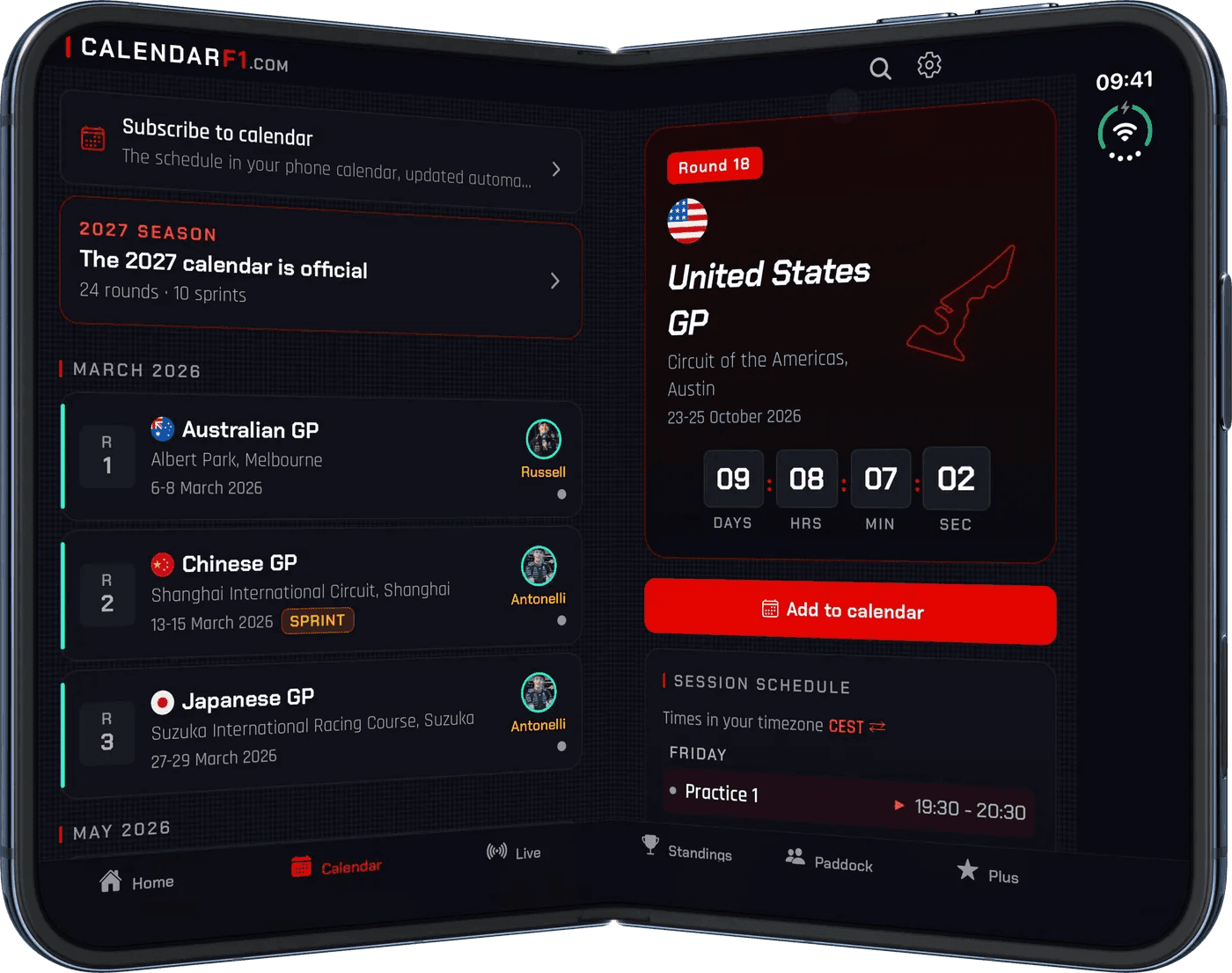
According to the release notes for version 1.6.0 (October 16, 2026), the app is "ready for iPhone Duo": it fills both displays and shows more at once when you unfold it. Unfolded, the Calendar puts the race list next to the selected race; Live puts the timing tower next to a second panel, with separate gap and lap columns; the driver and constructor standings sit side by side; and Home switches to two columns. Folding and unfolding keeps the race you have open and the live session you are watching. DuoDiscover has not yet tested the app on a device; the screenshot comes from the developer.
Compatibility
| Tier | Built for Duo |
|---|---|
| Uses the fold | Yes |
| Category | Sports |
| Price | Free + IAP |
| Verified | · developer statement |
| Added |
What the tiers mean: Understanding iPhone Duo app compatibility ›
Developer
Race Calendar & Live Timing is developed by Krzysztof Hendzel.
Official website: calendarf1.com/app
Get the app
Discuss Race Calendar & Live Timing in r/iPhoneduoapp ›
Browse all iPhone Duo apps · Sports apps · Launch day tracker · Submit an app
Race Calendar & Live Timing on iPhone Duo: FAQ
Is Race Calendar & Live Timing optimized for iPhone Duo?
Yes. Race Calendar & Live Timing is Built for Duo (Made for iPhone Duo): it uses the fold, Split View or the outer display. Verified on October 16, 2026 (developer statement).
What does Race Calendar & Live Timing look like on iPhone Duo unfolded and folded?
According to the release notes for version 1.6.0 (October 16, 2026), the app is "ready for iPhone Duo": it fills both displays and shows more at once when you unfold it. Unfolded, the Calendar puts the race list next to the selected race; Live puts the timing tower next to a second panel, with separate gap and lap columns; the driver and constructor standings sit side by side; and Home switches to two columns.
How much does Race Calendar & Live Timing cost?
Race Calendar & Live Timing costs Free + IAP on the App Store.