DuoDiscover
Maitland
Calm to-do list and paper-style planner that sorts tasks by how long they take
Maitland is built for iPhone Duo (it uses the fold, Split View or the outer display) as of .
About this app
Maitland, from Maitland Desk LLC, is a to-do app and planner for people who dislike being nagged by their own lists. There are no streaks, overdue flags or red badges: tasks are offered one at a time, and swiping one away is not tracked.
Capturing is quick. You type or say what needs doing, for example "pick up dog food, call the dentist about thursday", and Maitland splits it into separate cards in your own words, without rewriting them, and estimates how long each one takes. Tasks are then sorted into three piles: about 10 minutes, about 30 minutes, and an hour or more, so you can choose by the time you have. A card can be kept on top, on the Today view and the Lock Screen, until you put it back or tick it off. Dates are only set when your words include one, and reminders only when you ask for them.
The planner has a page for every day, week, month and year, with an hour-by-hour schedule and open space below for notes, and it can read and write your iPhone calendar. On iPad, Apple Pencil can write on any page.
Maitland is free to download, with in-app purchases.
Features
- Type or say tasks; each becomes its own card in your words
- Tasks sorted into 10-minute, 30-minute and hour-plus piles
- No streaks, overdue flags or nagging
- Dates and reminders only when you ask
- Day, week, month and year planner pages
- Reads and writes your iPhone calendar
- On iPhone Duo: the planner opens across two facing pages
Screenshots
How it uses iPhone Duo
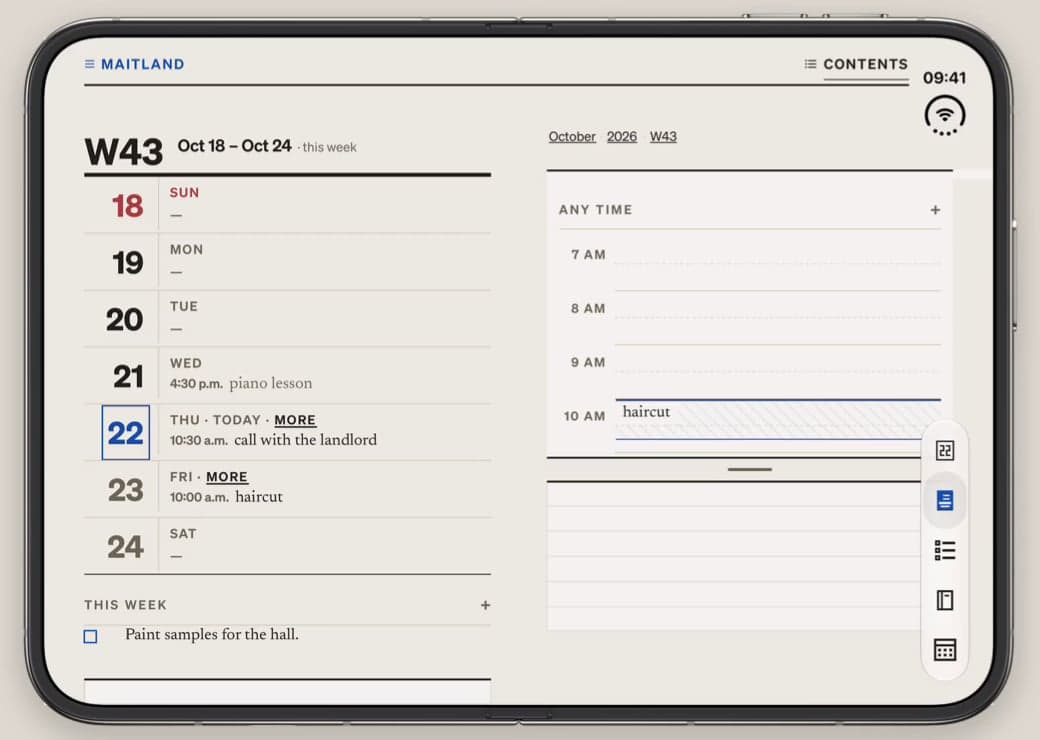
According to Maitland's App Store description, "on iPad and an open iPhone Duo, the planner opens across two facing pages", like a paper diary. The developer's video of the app on an unfolded iPhone Duo shows the week on the left page and the day's hour-by-hour schedule on the right, and the task piles next to the day view. The developer does not describe a specific outer-display or half-open layout. DuoDiscover has not yet tested Maitland on a device; the video and screenshot come from the developer.
Compatibility
| Tier | Built for Duo |
|---|---|
| Uses the fold | Yes |
| Category | Productivity |
| Price | Free + IAP |
| Verified | · developer statement |
| Added |
What the tiers mean: Understanding iPhone Duo app compatibility ›
Developer
Maitland is developed by Maitland Desk LLC.
Official website: maitland.app
Get the app
Discuss Maitland in r/iPhoneduoapp ›
Browse all iPhone Duo apps · Productivity apps · Launch day tracker · Submit an app
Maitland on iPhone Duo: FAQ
Is Maitland optimized for iPhone Duo?
Yes. Maitland is Built for Duo (Made for iPhone Duo): it uses the fold, Split View or the outer display. Verified on October 22, 2026 (developer statement).
What does Maitland look like on iPhone Duo unfolded and folded?
According to Maitland's App Store description, "on iPad and an open iPhone Duo, the planner opens across two facing pages", like a paper diary. The developer's video of the app on an unfolded iPhone Duo shows the week on the left page and the day's hour-by-hour schedule on the right, and the task piles next to the day view.
How much does Maitland cost?
Maitland costs Free + IAP on the App Store.